What Dribbble’s New Services Feature Means for Creative Freelancers?
What does Dribbble's 'Services' feature mean for creative freelancers? Turn your portfolio into sales & boost earnings! Learn how.
Dribbble is no longer just a place to showcase designs. It has evolved into a platform where creatives can offer and sell services directly. Understanding how it works opens new income opportunities. Here is how Dribbble services function.
So, Dribbble is making a new move in the freelance space. They’ve rolled out a “Services” feature, which means designers can now attempt to sell their creative services directly through the platform.
Sounds cool, and I invite you to see this feature in detail!
The idea is to shift Dribbble from being mainly a portfolio showcase to an active marketplace. But what does this change actually signal for creative freelancers and your business?
Ready to dive into the details? Let’s go!
What is the Dribbble “Services” feature?
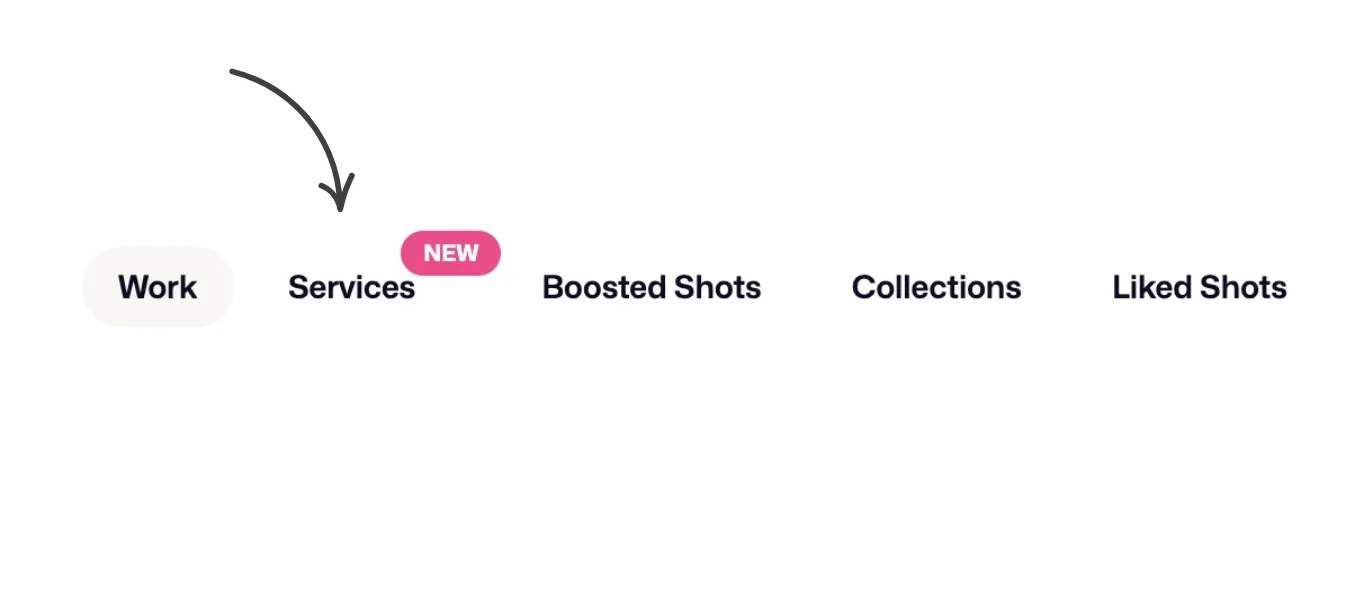
The “Services” feature, as you might guess, is a new feature where you can package and sell your freelance services.
This feature transforms Dribbble from just a showcase where you “display your work” into a marketplace where you can directly “sell your work.”
You can think of it just like an e-commerce site. But here, what’s being sold isn’t a physical product, but your skills and the creative online services you offer.
For example, on your profile, you can sell specific services like “Minimal Mobile App Design” and “Website Icon Set.” If clients like these services, they can purchase them instantly.
However, Dribbble’s Service categories are created only for designers.
For instance, categories like Website Design, Branding, Typography, Illustration, and App & Product Design. But there’s no space allocated for writers, consultants, developers, and others.
How to create a service pack on Dribbble? Step-by-step guide
Let’s take a step-by-step look at how Dribbble’s new “Services” feature works and how to use it!
1. Click the “create new service” button
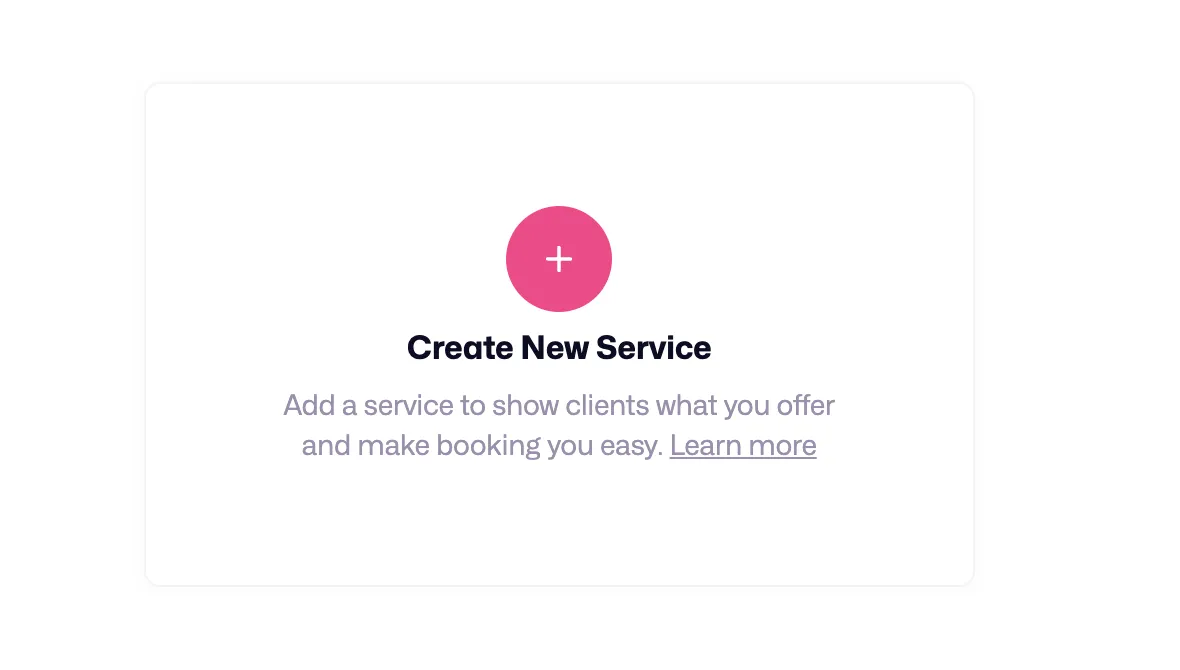
To list a service, go to the “Services” page on your profile.
Then, you need to click the “create new service” button, but if you haven’t set up your payment method beforehand, you’ll be redirected to the setup page. Complete the setup by choosing Stripe or Payoneer (it takes about 2 minutes).
→ And be aware that these payment platforms may incur additional costs.
If you have already set up your payment method, you can skip this step.
2. Set a service title
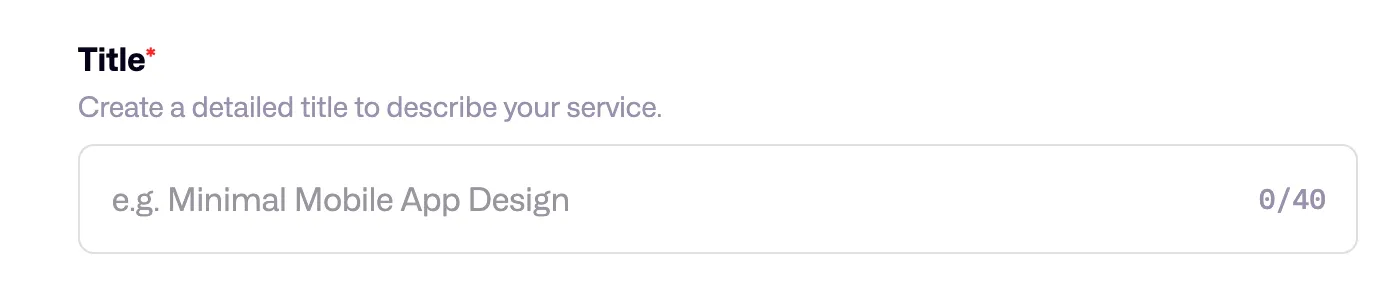
Set a title for your service, and in my opinion, try to be specific when doing so. For example, if you set a title like “Blog post for technology sites” instead of “Blog post,” your target customers will find you easily.
This way, by going into subcategories, you can reach high-budget clients looking for much more specific services. This also helps you become the “best” in a niche category and gain a steady stream of income.
3. Explain the details of the service
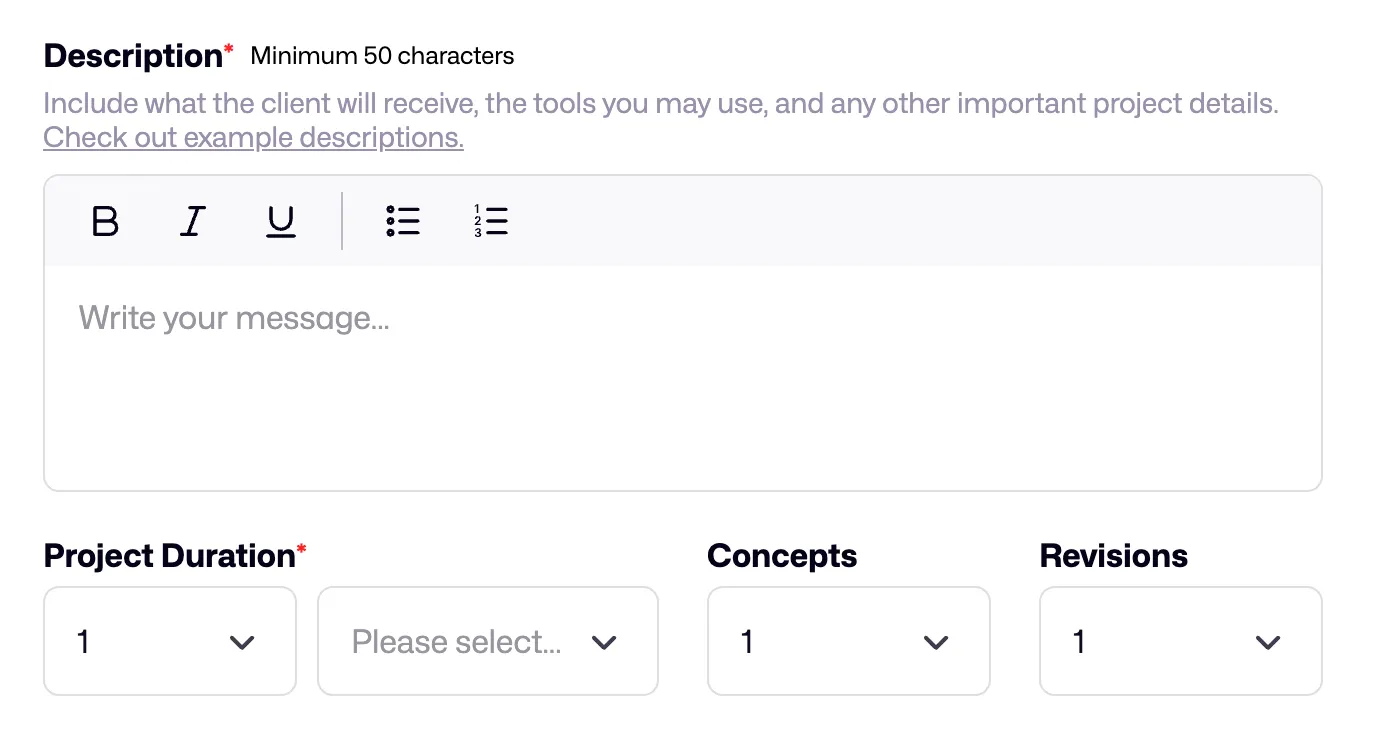
You need to clearly define the scope of your service.
- How long will it take you to deliver?
- How many revisions are you offering?
- What is your price?
If your client is considering purchasing your service, they usually want to see a persuasive text and carefully prepared service details in the description section.
Therefore, make sure that you have written everything that needs to be known about the service in the ‘Description’ section.
Also, it would be good to offer a minimum of 1-2 revisions because clients are more inclined to agree when they know their revision rights. My advice is to increase the number of revisions as much as possible when making your first sales.
4. Add category and tags
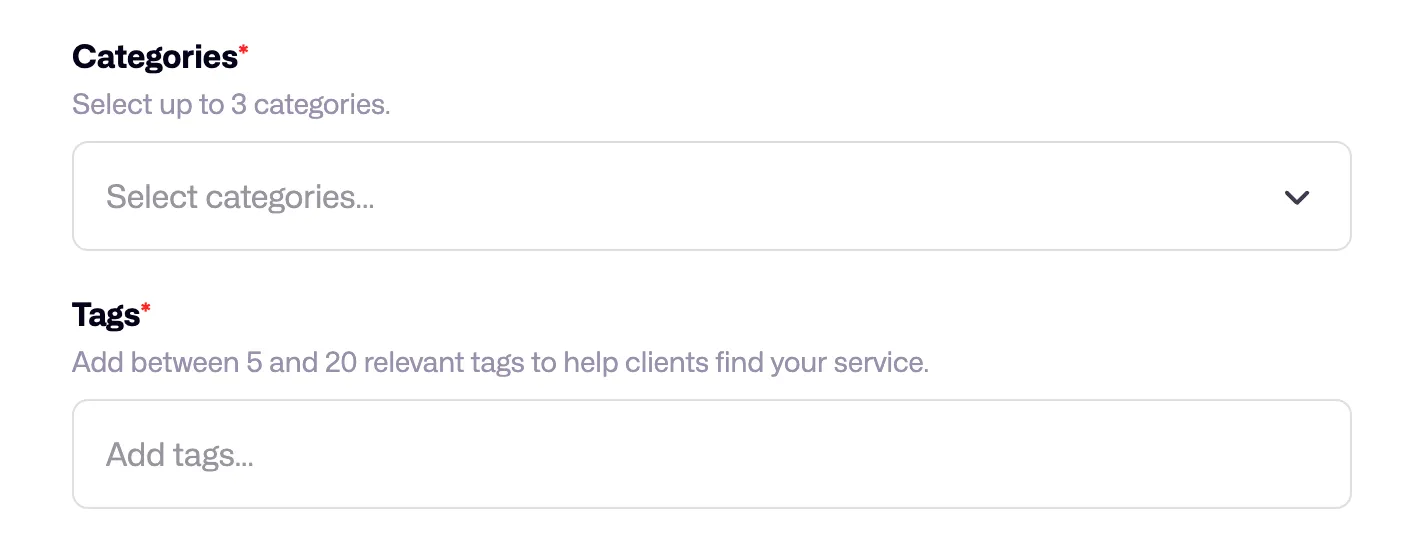
Choosing Categories and Tags is a crucial stage for potential customers to find you.
You can see that categories are divided into sections like Web Design, Branding, and Illustration. The subcategories under the App & Product Design category are:
- Mobile app design
- Web app design
- Icon design
- Software design
- UX design
So, by also selecting the subcategories of a category you wish, for example, you can increase your chances of appearing before customers searching for “UX design” services.
Tags work in a similar way: You can optimize your services by additionally adding keywords here that describe your service.
5. Add a visual (shots)
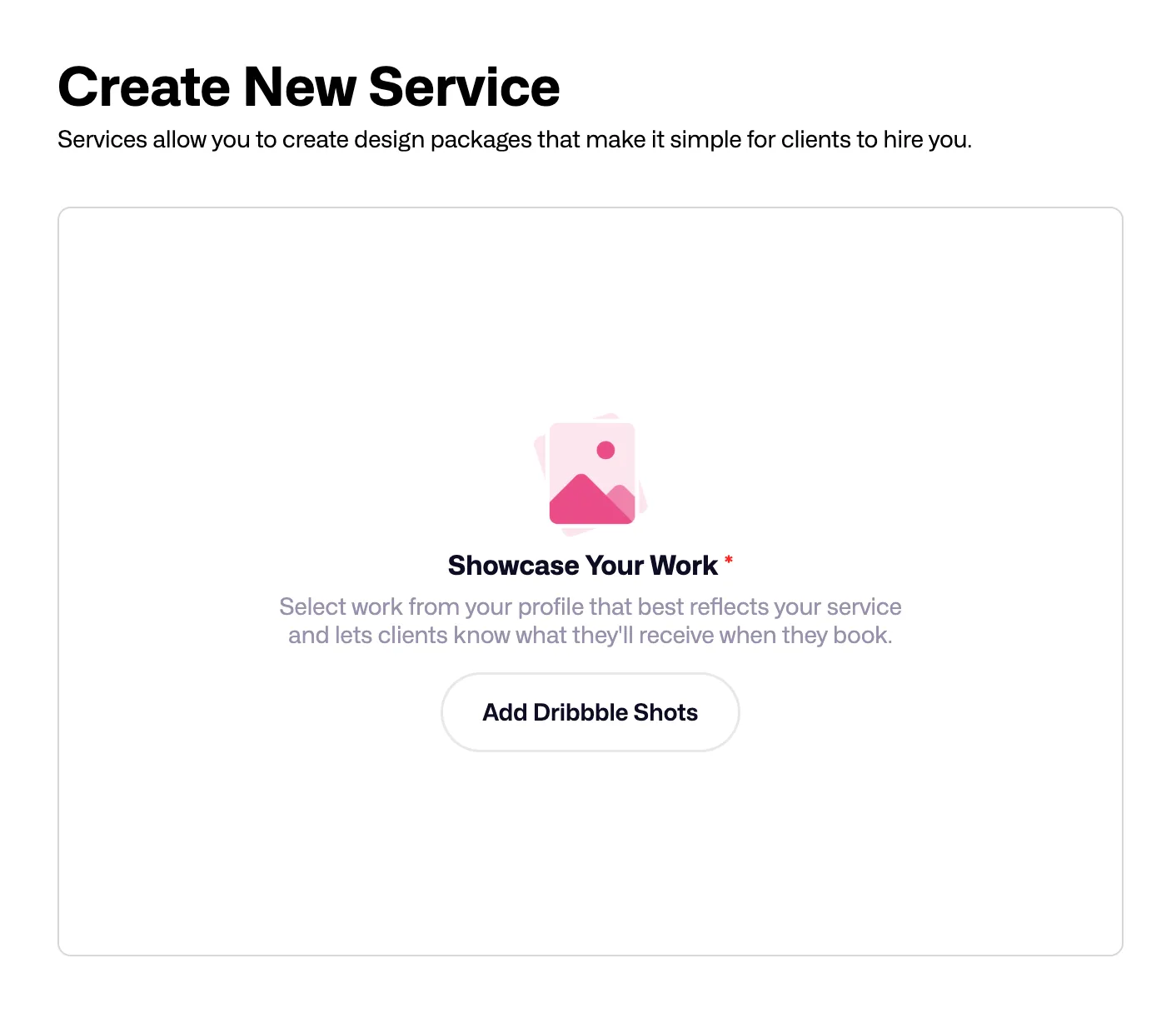
If you’ve used Dribbble, you might know that there’s a “Shots” section where you can quickly share your work. I liken this to “Posts” on Instagram.
When creating a service package on Dribbble, you need to add your previously published Shots as visuals. This way, the customer isn’t solely reliant on the description section but gains more comprehensive information about the project they will receive.
Adding a Shot is simple; as shown in the image above (referring to an image in the original context), you can add visuals related to your service by clicking the “Add Dribbble Shots” button.
6. Set a fixed price or use milestones
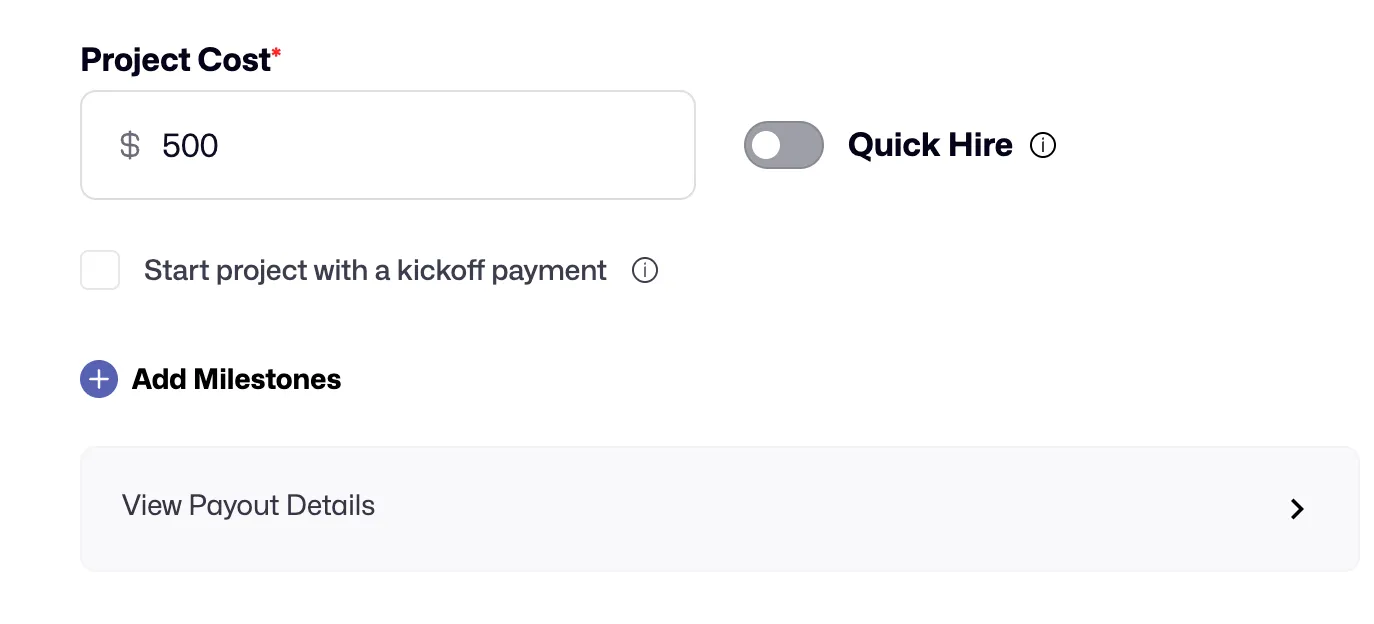
Finally, add the price for your service. But here, I want to tell you about a useful feature you should know.
Using the Milestones feature, you can divide the project into phases and receive your payment as each milestone is completed.
What you need to do is click the “Add Milestones” button, then divide the project into phases and price each phase (Milestone).
An example view:
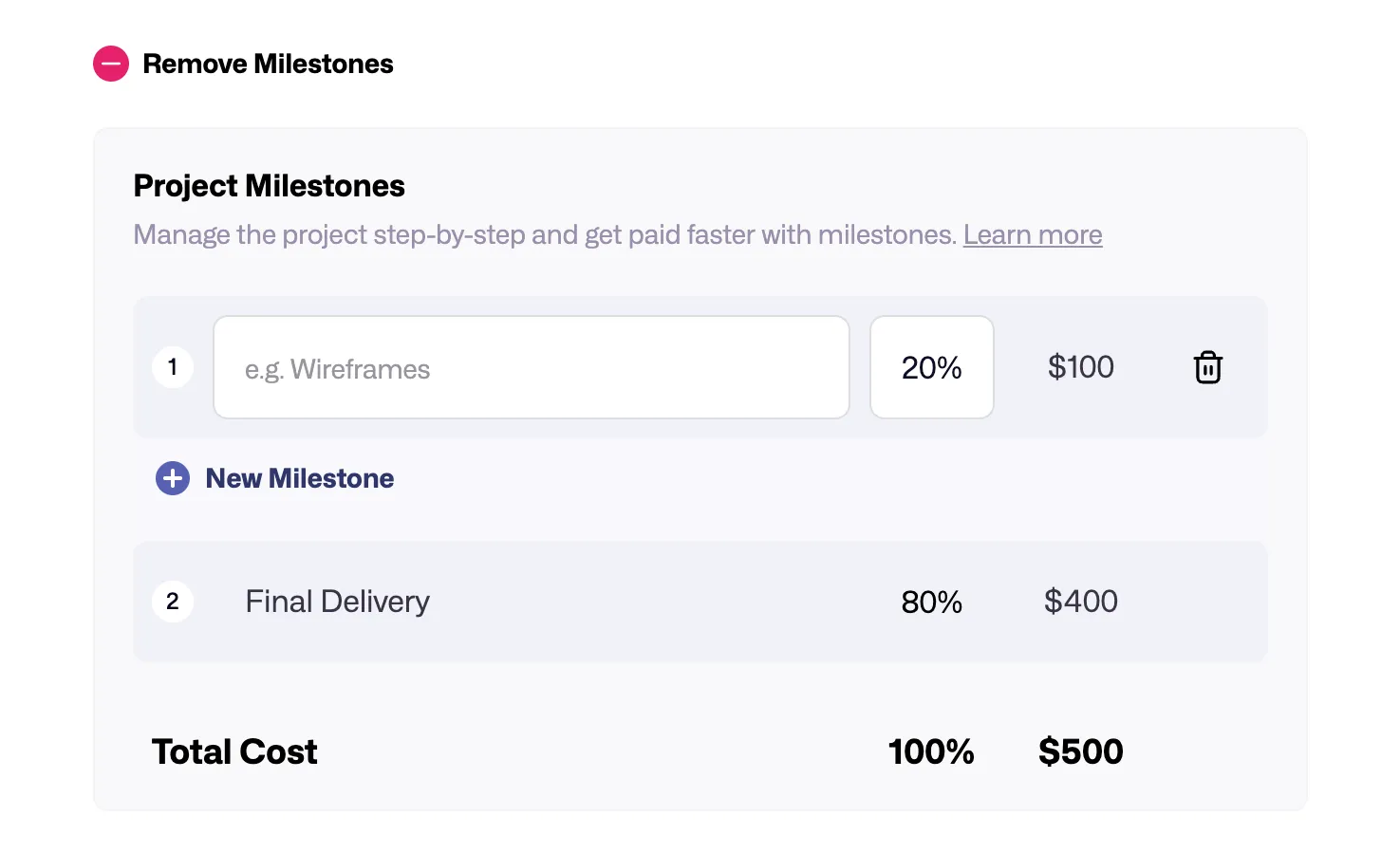
This way, your cash flow increases, each part of the project becomes more manageable, and your motivation also rises. For instance, if it’s a long-term project but you need cash, you can receive payments step-by-step with Milestones before the project is even finished.
If you tried Upwork, it works a bit similarly.
7. Optionally, activate quick hire
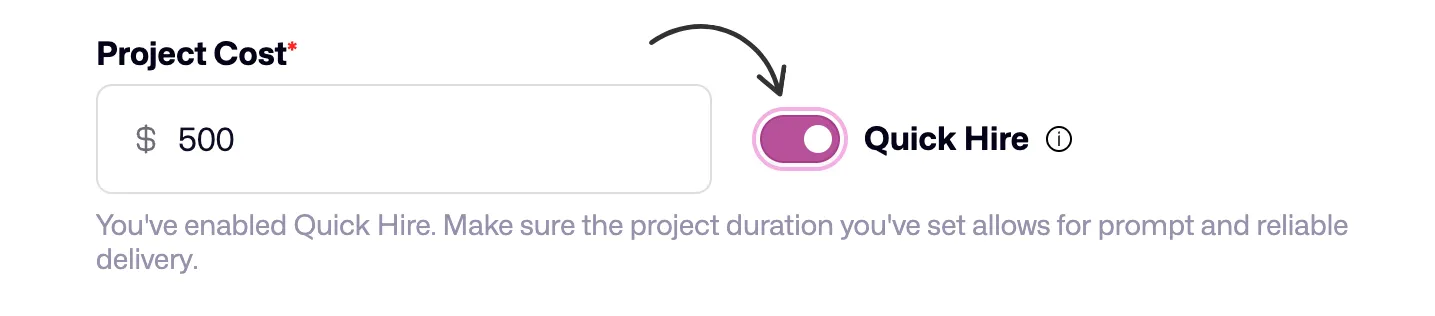
If your service is a clear and standard package, clients can instantly hire you and make the payment using the “Quick Hire” button. You can activate this button to put an end to lengthy correspondence and negotiations.
Just activate the “Quick Hire” button next to “Project Cost.”
8. Finally, publish
After completing everything, you can publish the service by clicking the “Create Service” button.
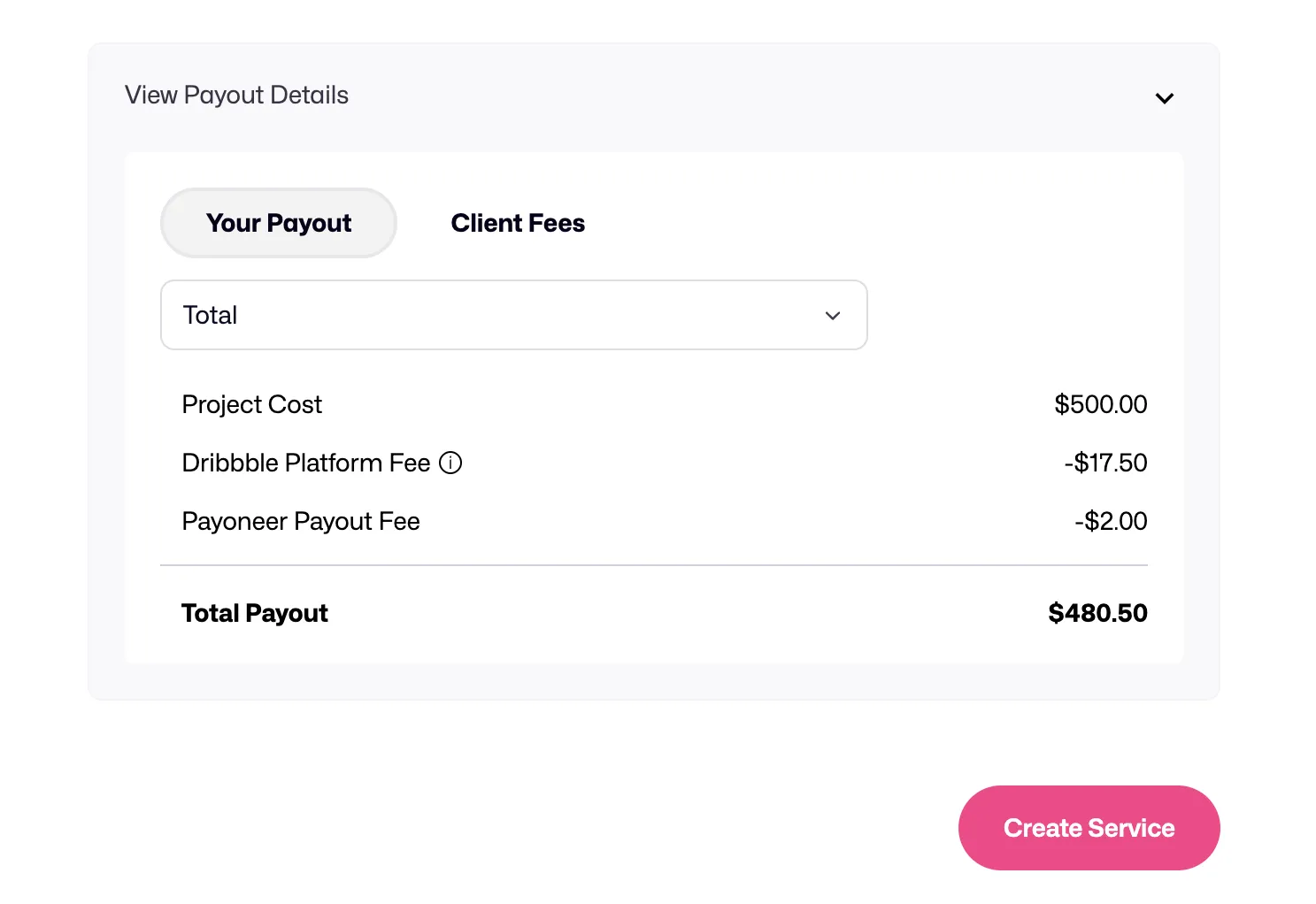
Just before publishing, you can see the platform’s commission and other commissions that will be deducted according to the payment method. This way, you’ll know the net earnings that will go into your wallet after the service sale.
Additionally, if you click on the “Client Fees” section, you will also see the fees that will be deducted from your client. Frankly, this is quite good for both the freelancer and the client to see the prices transparently.
What does that mean for you?
Let’s take a look at what benefits this new arrangement offers you as a freelancer:
1. More visibility, more clients
Now, not only those who visit your profile but also potential clients searching directly for “logo design” on Dribbble will be able to see your services. This is incredibly helpful for getting discovered, especially if you’re new or work in a niche area.
2. Finding work is now easier
Thanks to “Quick Hire,” that long “I submitted a proposal, now I’m waiting for a response” process between you and clients is shortened. If they like it, they can start the job instantly. I think it will work effectively, especially for keeping client communication to a minimum.
You’re converting your skills into clearly priced packages with a defined scope. This can provide you with a steady income stream, especially if you have frequently requested, repeatable jobs (for example, a “monthly social media design package”).
3. Misunderstandings and disputes are reduced
You clearly define from the outset what work you will do, how long it will take, and for how much. Misunderstandings and feedback like “but I wanted this too” are reduced.
Especially if you’ve made a sale via “Quick Hire,” your justification increases because the client has accepted everything upfront.
What you need to know about the new feature
Just as every rose has its thorn, there are a few points here you need to be careful about:
- As services become more visible, naturally, more designers will want a piece of this pie. It’s important to set yourself apart and offer unique propositions.
- Dribbble wants communication and payments for jobs initiated on the platform to also be conducted through the platform. While this is good for security, the commissions (if you’re not Pro, 3.5% is taken from the designer, and a tiered fee is taken from the client) can be annoying.
- If you’re making instant sales with “Quick Hire,” you must very clearly write what is included and excluded in the package. This is to avoid “but I was expecting this too” situations later on.
- Some long-time users are concerned that the platform is becoming too commercialized and moving away from its old, intimate community atmosphere. You can alleviate these concerns by delivering high-quality work.
6 things to consider when listing services on Dribbble
Allow me to share a few tips you should pay attention to when listing Services:
- Emphasize your value: What problem are you solving for the client? What benefit are you providing them? Don’t just explain “what you do,” but “what they will gain.” If possible, speak in numbers (e.g., “I increased engagement by X% with my designs”).
- Know who you’re selling to: Who is your target audience? Startups? E-commerce sites? Speak their language.
- Let your visuals speak: Use your best, most relevant, highest-resolution “Shots.” Remember, Dribbble is a visual platform.
- Be clear about your scope: Clearly write what is included and what is not.
- Use keywords: How do clients search for you? Use keywords like “mobile app design,” and “UX design” in your titles and descriptions.
- Build trust: If you have client testimonials or success stories, add them. Dribbble allows you to import reviews from external sources.
Dribbble vs. others: Where’s the difference?
We actually recognize Dribbble’s new “Service” feature from Upwork’s “Project Catalog” and Fiverr’s “Gig” structure. From this perspective, I want to point out that Dribbble isn’t offering something entirely new.
But, of course, it’s still necessary to compare Dribbble with others and weigh which one is better.
Dribbble vs. other platforms:
- Upwork’s Project Catalog is similar to Dribbble Services, but Upwork generally takes a 10% commission. This rate was higher recently, but it’s still a very high rate compared to Dribbble.
- Fiverr’s Gigs are more for quick and affordable jobs, and its commission is high, around 20%. And because it has a more competitive environment compared to Dribbble, it’s frankly not very logical.
In short, Dribbble is a “premium yet accessible” graphic design site that brings together only talented designers with clients who are looking for quality design and have a budget. This means less of a “price-cutting race” for you and more “value-focused competition.”
Final words
Dribbble’s “Services” is a useful feature for freelancers. But remember, the greatest value is you, your brand, your expertise.
- Adapt, keep learning: The world is changing, and platforms are evolving. Be open to innovations.
- Your personal brand is everything: Dribbble is a tool; the goal is you. Specializing in a niche area will set you apart from the crowd.
- Don’t put all your eggs in one basket: Dribbble is great, but don’t tie all your hopes to a single platform. Have your own website, social media, and network as well.
While Dribbble provides you with power and convenience on one hand, it can make you more dependent on the platform on the other. Be strategic, use Dribbble as a “partner,” but never completely relinquish control of your business and client relationships.
What freelancers truly need
Freelancing is always changing. New tools, new platforms, new promises. But what you really need is something that understands your whole business, not just one part of it.
That’s where Ruul comes in. It’s a full toolkit made for all freelancers: writers, designers, developers, consultants, you name it.
- The Ruul difference: True freedom for every freelancer with one transparent, low 5% transaction fee. No surprises, just more of your earnings in your pocket.
Why jump between apps or settle for tools that don’t scale with you?
Ruul grows with your goals, no matter where in the world you are.
Time to take control.
Try Ruul and level up your freelance life.
Related articles
Freelancer.com vs Upwork Which is Better for Freelancers?
WorkApr 22, 2026
Freelancing always booms in times of adversity or uncertainty
WorkApr 5, 2026
AI for Freelancers: The Complete Guide (2026)
WorkJun 2, 2026
Top Alternatives To Linktree For Freelancers Selling Services
WorkApr 22, 2026
PeoplePerHour vs. Fiverr: Which Platform is Better for Freelancers?
WorkApr 22, 2026